Google+ Stories and Movies: memories made easier

A suitcase full of dirty clothes. A sad-looking house plant. And 437 photos and videos on your phone, tablet and camera. This is the typically messy scene after a vacation. And although we can’t do your laundry (thanks but no thanks), or run your errands (well, maybe a few), we’d still like to help. Enter Google+ Stories, which can automatically weave your photos, videos and the places you visited into a beautiful travelogue.

No more sifting through photos for your best shots, racking your brain for the sights you saw, or letting your videos collect virtual dust. We’ll just gift you a story after you get home. This way you can relive your favorite moments, share them with others, and remember why you traveled in the first place.

Stories will be available this week on Android and the web, with iOS coming soon. In the meantime you can browse my story below (click to start), or explore a few others by paraglider Tom de Dorlodot, DJ Steve Aoki and Allrecipes photographer Angela Sackett.
When it’s less about travel, and more about today's events (like a birthday party, or baby’s first steps), Google+ Movies can produce a highlight reel of your photos and videos automatically—including effects, transitions and a soundtrack. Today we’re bringing Movies to Android, iOS and the web, so lots more people will receive these video vignettes.

A movie of my daughter’s first bike ride, created automatically by Google+

To get started with Stories and Movies, simply back up your photos and videos to Google+. And that’s it. Auto Awesome will get to work in the background, and you’ll get notified when a story or movie is ready.

In fact: if your photo library is already online, you may already have stories waiting for you. So look for the new app in Google Play, view the full list of improvements on Google+, and enjoy your walks down memory lane.

Bringing the Rubik's Cube to the next generation of problem solvers

As a designer, it's always humbling when you encounter a perfect piece of design. Good design attracts our attention with its beauty, doesn’t need a user manual, is universally understood by anyone in the world, and is simple without sacrificing functionality.

In 1974, the world gave us one such piece of perfect design—the Rubik's Cube. Budapest-based educator and inventor ErnÅ‘ Rubik created the puzzle originally to help his students better understand spatial geometry. Released to the public in the 1980s, it quickly became an international obsession, bigger than hairspray and breakdancing combined. But the Rubik’s Cube is more than just a toy; it’s a puzzle waiting to be solved and a question waiting to be answered. Over the past 40 years, the cube has puzzled, frustrated, and fascinated so many of us, and has helped spark an interest in math and problem solving in millions of kids. That’s part of why so many of us at Google love the cube, and why we're so excited to celebrate its 40th birthday this year.

As everyone knows (right??), there are 519 quintillion permutations for the Rubik’s cube, so May 19 seemed like a fine day to celebrate its 40th anniversary. To kick things off, we’re using some of our favorite web technologies (HTML5 and Three.js among others) to bring the cube to the world in the form of one of our most technically ambitious doodles yet. You can twist and turn it by dragging along its sides, but with full respect to all the speedcubers out there, we’ve included keyboard shortcuts:
Using the same technology that’s behind the doodle, we built Chrome Cube Lab, a series of Chrome Experiments by designers and technologists that reinterpret Rubik’s puzzle with the full power of the web. Create your own music with experiments 808Cube and SynthCube; make a custom, shareable cube of your own photos and GIFs with ImageCube; or send a scrambly message with the Type Cube. You can visit some of these experiments at the Liberty Science Center’s Beyond Rubik’s Cube exhibition, and if you'd like to explore the cube even further, consider borrowing the cube’s source code to build an experiment of your own.

We hope you enjoy getting to know the cube from a few new angles.

Through the Google lens: search trends May 9-15

Search is often the first place we turn when something unexpected or unusual happens. This week is no exception, as people looked for news on a celebrity smackdown, an interspecies showdown and everything in between.

When the news is news
A newsroom shuffle at the New York Times put the Grey Lady at the top of headlines around the country. Wednesday, it was announced that Jill Abramson, who served as executive editor since 2011 and was the first woman in that position, would be replaced by Dean Baquet (himself a “first”—no African-American has held the job before now). Searchers scrambled to find information on the story behind the story.

The Finals countdown
Basketball continues to be in the search spotlight as the NBA Finals approach. After a crazy, up-and-down, roller-coaster first round, the second round went more according to plan. Now we’re rewarded with matchups of the top two seeds in each conference finals, leading people to do some searching for the Spurs, Thunder, Heat and Pacers. While those teams are preparing for their next opponent, some teams are already making changes to prepare for next year; the Golden State Warriors announced a new coach, Steve Kerr, a former player with five championships under his belt. Searchers looked for information on [steve kerr rings] and [steve kerr bulls] (he won three of those rings in Chicago), as well as [steve kerr knicks]—rumor has it that Kerr turned down an offer to coach that team.
What a wonderful web
Legions of loyal cat people felt vindicated this week when a video of a family’s “hero cat” saving a four-year-old boy from a dog attack went viral. Not only were there hundreds of thousands of searches for [cat saves boy from dog], but the video now has more than 9 million views on YouTube. I personally vouch that it’s worth your time.

In other viral news, Macaulay Culkin was photographed wearing a T-shirt showing my own favorite famous person Ryan Gosling wearing a T-shirt of Macaulay Culkin back in his “Home Alone” days. People rushed to the web to see the photos, as well as create their own recursive images. As the A.V. Club says: great job, Internet!

Bey it ain’t so
An elevator surveillance video released by TMZ and showing Solange Knowles in a physical altercation with brother-in-law Jay-Z inspired a frenzy of speculation and search activity—and you could say it added one more problem to Jay’s list. Monday’s top trending topic—with more than 5 million searches!—was [tmz], and searches for terms like [solange attacks jay], [jay z fight] and [solange fight] were through the roof. Call it a testament to Bey and Jay’s status as celebrity royalty.

Hop on board—and go almost anywhere—with public transit on Google Maps

More than 70 percent of the world’s population doesn’t own a car1—a surprising fact for anyone who’s sat for what seems like hours on end in bumper-to-bumper traffic. Millions of people rely on public transit to get around. That’s why, since 2007, we’ve worked to include public transit routes and schedules in Google Maps. In fact, buses, trains, trams and subways included in Google Maps travel 200 million kilometers every day—that’s the equivalent of driving every single road in the world three times!2
Today, Google Maps is helping you get around on public transit even more easily with these additions:
  • We’ve added every single transit route in Great Britain to Google Maps—making it easier to get anywhere from Land’s End to John O’Groats.
  • On the other side of the globe, Vancouverites looking for sun can now get real-time updates on whether a bus to Kits is faster than one to Third Beach.
  • In Chicago, Cubs fans can now zip to and from Wrigley Field, armed with the real-time information they need to hop on a bus and avoid congestion on Lake Shore Drive.
  • And finally, just in time for the games, we’ve recently added transit information for every host city in Brazil. Can you say “GOOOAAALLLLL?!”
Our transit data spans six continents, 64 countries and more than 15,000 towns and cities worldwide. And we’re not done yet: Google Maps will continue to improve—serving people the information they need to get around town when and where they need it.


1 This estimate is based on the most recent World Bank data on the number of passenger cars per 1,000 people throughout 100 countries and territories. Passenger cars refer to road motor vehicles, other than two-wheelers, intended for the carriage of passengers and designed to seat no more than nine people (including the driver).
2 CIA World Factbook

Speak and learn with Spell Up, our latest Chrome Experiment

As a student growing up in France, I was always looking for ways to improve my English, often with a heavy French-to-English dictionary in tow. Since then, technology has opened up a world of new educational opportunities, from simple searches to Google Translate (and our backpacks have gotten a lot lighter). But it can be hard to find time and the means to practice a new language. So when the Web Speech API made it possible to speak to our phones, tablets and computers, I got curious about whether this technology could help people learn a language more easily.

That’s the idea behind Spell Up, a new word game and Chrome Experiment that helps you improve your English using your voice—and a modern browser, of course. It’s like a virtual spelling bee, with a twist.

We worked with game designers and teachers to make Spell Up both fun and educational. The goal of the game is to correctly spell the words you hear and stack them to build the highest word tower you can—letter by letter, word by word. The higher the tower gets, the more difficult the word challenges: You’ll be asked to pronounce words correctly, solve word jumbles and guess mystery words. You can earn bonuses and coins to level up faster.

Spell Up works best in Chrome on your computer and on Android phones and tablets. (It also works on iPhones and iPads, but you’ll need to type rather than talk.) Whether you’re just learning English or you’re already a pro, check it out! And if you’re a teacher, we encourage you to try it out in your classroom.

Through the Google lens: search trends May 2-8

Here’s our look back at the stories and searches that made this week, from lightsabers to Lewinsky.

Mint juleps and margaritas
This past week people across the country celebrated several long-held traditions and some newer ones. With the 140th “Run for the Roses” on Saturday, there were more than 2 million searches on the subject of the Kentucky Derby, including research on [kentucky derby time] and [kentucky derby horses]. (We’re partial to derby fashion.) Then, on Sunday, nerds everywhere celebrated what’s come to be known as “Star Wars Day,” thus named because the date lends itself to the pun “May the Fourth be with you.” According to search data at least, the unofficial holiday has been getting bigger every year. And finally, Monday’s Cinco de Mayo inspired lots of pranks, jokes, and more than a few people looking up the history of the holiday.
Red carpet moments and capital celebs
At this week’s Met Gala, the annual fundraising event for the Metropolitan Museum of Art’s Costume Institute, celebrities like Kim Kardashian, Beyonce and Blake Lively turned heads and inspired searches. And though searchers were interested in the White House Correspondents Dinner, it was old, not new, Beltway gossip that dominated this week. In a “Vanity Fair” essay, Monica Lewinsky broke a 10-year media silence to talk about life since the affair that made her a household name. Search interest in Lewinsky subsequently jumped to the highest point ever since 2004 (the time period for which data is available) as people looked for more information on the original story as well as [lewinsky now].
On the issues
The phrase “Bring Back our Girls” became a rallying cry to raise awareness about a group of nearly 300 school girls abducted in Nigeria in April. A number of leaders, including Michelle Obama and Hillary Clinton, have raised their voices in support of the campaign.

On a completely different viral note, Jimmy Kimmel hit the streets asking people “what is gluten?” This now viral YouTube video has left many people laughing at the responses, as well as looking up the definition of gluten, and related issues such as celiac disease, for themselves.

Giving thanks to teachers and moms
We hope you took time to thank a teacher for Teacher Appreciation Week. More than a hundred thousand searches on the topic indicate that people around the country were showing their gratitude. And finally, Mother’s Day is this Sunday, and many people were looking up gifts—from more traditional treats like flower deliveries and chocolate-covered berries, to creative DIY ideas and even poems. For those of you whose moms are teachers as well (like mine), this is an even better time to show them you care.

Welcome to the Tech Hub Network family, Capital Factory!

Austin is home to some of the best barbecue in the country, a killer live music scene, and an energy that can match any other city in the world. It’s no coincidence, then, that it’s also home to some of the most creative entrepreneurs out there, which is why we’re pleased to welcome Capital Factory, an Austin-based incubator and co-working space for startups, to the Google for Entrepreneurs Tech Hub Network. The city’s thriving startup community and deep bench of engineering talent, combined with its natural creativity and eclecticism, make it the perfect place to expand.

Capital Factory is the eighth space to join the Network, a group of partner organizations across the U.S. that does everything from hosting accelerator programs for talented developers to providing desks for entrepreneurs. Google for Entrepreneurs provides funding to all the hubs and give them access to mentorship opportunities and Google products.

In just over six months, the Tech Hub Network is already having a dramatic effect on entrepreneurs around North America. Seventy-one percent of startups say their hub is having a significant impact on their growth, and companies from the Network have raised more than $50 million and created 1,200 jobs since becoming members. Just last month, we hosted a Demo Day for these hubs, where 10 startups raised millions of dollars to help grow their businesses.

To give these entrepreneurs an even greater boost going forward, starting today anyone who works in one of the eight tech hubs or Google’s Campus London and Tel Aviv will be able to work for free from the other member spaces when traveling. This will give startups a home base when they’re on the road, and the chance to spread and exchange ideas from city to city.


Not too long ago, Google was just a small startup in a garage. Now that we’ve grown up a bit, we want to give others a place where they can work on their ideas, and feed off each other’s creativity and ingenuity. Capital Factory is no exception. So, get your boots on, Austin entrepreneurs—we can’t wait to see how your growing startup community plays its part in keeping Austin weird.

Previewing a new Classroom

As a former high school math teacher, I know all too well that teachers spend a ton of valuable time doing things other than teaching—waking up early to grade quizzes, collecting and returning piles of paper assignments, and battling copy machine paper jams. But with today’s technology it doesn’t have to be this way. Many teachers and professors have found ways to use technology to be better educators and avoid busy work. We spent the past year working closely with many educators to understand the systems they use to simplify their workloads, so they can get back to doing what they love—teaching.

Today, in honor of Teacher Appreciation Day, we’re announcing a preview of Classroom, a new, free tool in the Google Apps for Education suite. It helps teachers create and organize assignments quickly, provide feedback efficiently, and communicate with their classes with ease. Classroom is based on the principle that educational tools should be simple and easy to use, and is designed to give teachers more time to teach and students more time to learn.

With Classroom, you'll be able to:

  • Create and collect assignments: Classroom weaves together Google Docs, Drive and Gmail to help teachers create and collect assignments paperlessly. They can quickly see who has or hasn't completed the work, and provide direct, real-time feedback to individual students.
  • Improve class communications: Teachers can make announcements, ask questions and comment with students in real time—improving communication inside and outside of class.
  • Stay organized: Classroom automatically creates Drive folders for each assignment and for each student. Students can easily see what’s due on their Assignments page.

We know that protecting your students’ privacy is critical. Like the rest of our Apps for Education services, Classroom contains no ads, never uses your content or student data for advertising purposes, and is free for schools.
Starting today, teachers and professors can apply for a preview of Classroom. Based on the requests we receive, we’ll be inviting a limited number of educators to try Classroom in about a month. By September, Classroom will be available to any school using Google Apps for Education. Since we want to make sure Classroom plays well with others, if you’re a developer or partner, sign up to learn more about integrating with Classroom.

We’ve been working with more than a dozen pilot schools and universities to try out Classroom and provide feedback—and we can’t thank them enough. We can’t wait to hear your feedback, and to work together to make Classroom even better.

Through the Google lens: search trends April 25-May 1

From matters of the heart to matters off the court, join us on a trip to a galaxy far, far away for our look back at this week's search trends.

Searching for romance
It’s the end of George as we know him. Saturday, word got out that longtime bachelor George Clooney was engaged to his girlfriend, Amal Alamuddin. Alamuddin is a respected human rights lawyer in Britain, but she’s not—or wasn’t—a household name, and many people turned to search to learn more about the woman who captured Clooney’s heart. While they were at it, they looked for information on actress Talia Balsam, who was married to George in the early 90’s (for those of you paying attention, that’s pre-Doug Ross!). In other celebrity couple news, Prince Harry and Cressida Bonas have reportedly broken up. So, if you’re disappointed that George is off the market, there’s still hope for women around the world wishing to marry a royal.

A historic week for the NBA
NBA commissioner Adam Silver made league history this week when he fined Clippers owner Donald Sterling and banned him from the league for recent comments. Millions of searches followed, and terms like [adam silver comments], [adam silver sterling], [adam sterling clippers] immediately climbed more than 1,000 percent.

The fetch is strong with this one
On Wednesday, we wore pink in celebration of the 10th anniversary of Tina Fey’s “Mean Girls.” The movie that gave us “fetch” was the subject of so many searches, quizzes (searches for [mean girls quiz] were up 350 percent) and retrospectives that even Cady Heron might have trouble adding them up. And though rumors of a [mean girls reunion] (up 850 percent) are apparently false, that can’t exactly be said of another movie on searchers’ minds this week: “Star Wars.” A photo revealing the cast of J.J. Abrams’ “Episode VII” showed original stars Harrison Ford, Carrie Fisher, Mark Hamill and more seated alongside new faces like John Boyega, Daisy Ridley and Adam Driver. The new cast members were on the top of the search charts quicker than the Millennium Falcon could make the Kessel Run. (Fun fact: searches for [bill weasley] were also on the rise; “Episode VII”’s Domhnall Gleeson played him in the “Harry Potter” movies.).
Wordplay
Actress Emma Stone made headlines this week when she faced off against Late Night’s Jimmy Fallon in an epic lip syncing battle; searches for [emma stone fallon] climbed 2,200 percent. But while we can’t deny Emma’s spoken-word skills, we’ve got a soft spot for two other playful phrases that made the zeitgeist this week. On Saturday, searchers learned that [zonkey] was not an adjective for how you feel after a red-eye, but actually a rare zebra/donkey cross born last week in Mexico. And [it’s gonna be May] was trending Wednesday after Organizing for Action’s Barack Obama Facebook page used the meme-y caption on a photo showing POTUS with Justin Timberlake. Just to bring this week full circle, the Know Your Meme entry on “It’s gonna be May” includes a reference to… “Mean Girls.”

Happy Friday, and we’ll see you next week.

New mobile apps for Docs, Sheets and Slides—work offline and on the go

Every year, phones and tablets get better, and more of you are starting to use your mobile devices not just to view, but also to create and edit content. And while the Drive app is a convenient place to store your stuff, we want to make it easier for you to quickly find, edit and create documents, spreadsheets, and presentations on the go. Starting today, you can download new, standalone mobile apps for Docs and Sheets—with Slides coming soon. Need to find a spreadsheet? Go to the Sheets app. Need to create a document? Go to the Docs app. They’re all right there at your fingertips.

When you open the new apps, you’ll see your most recently edited files, which means less time searching and scrolling.

The apps also come with offline support built in, so you can easily view, edit and create files without an Internet connection. Now, if you have a brilliant idea for a best-selling novel while traipsing through the Amazonian rainforest (or you know, something more probable, like during flight takeoff)...no problem. You can jot down your idea in the Docs app on your phone, even when you’re offline.

You can get the apps on Google Play [Docs] [Sheets] and in the App Store [Docs] [Sheets]. If you don’t have time now, over the next few days you’ll be prompted to download the apps when you go to edit or create a document or spreadsheet in your Drive app. And of course, you’ll still be able to use the Drive app to view and organize all of your documents, spreadsheets, presentations, photos and more.

So enjoy the Amazon—we’re looking forward to buying that novel someday. And in the meantime, just remember: even if a crocodile eats your phone, your files are safe in the cloud!

Android for all and the new Nexus 5

Just in time for Halloween, we have two new treats for Android fans. First, we're excited to unwrap our latest platform release, KitKat, which delivers a smarter, more immersive Android experience to even more people. And second, we're introducing Nexus 5—a new Nexus phone developed with LG.

The first thing you’ll notice about KitKat is we’ve made the experience much more engaging: the book you're reading, the game you're playing, or the movie you're watching—now all of these take center stage with the new immersive mode, which automatically hides everything except what you really want to see.

Bringing more Google smarts to Android
Behind the polish on the screen is the power under the hood. Take the Phone app, which for most people hasn’t really changed since the days of flip phones. Now, we’re making calling easier than ever, by helping you search across your contacts, nearby places, or even Google Apps accounts (like your company’s directory), directly from within the app. And with the new Hangouts app, all of your SMS and MMS messages are together in the same place, alongside your other conversations and video calls, so you’ll never miss a message no matter how your friends send it. This is just a small taste of KitKat—learn more on our site.

Google has always focused on helping users get immediate access to the information they need, and we want to bring this same convenience and power to users on Android. With the new Nexus 5 launcher, Google smarts are deeply integrated into the phone you carry around with you, so getting to the information you need is simple, easy and fast. Swipe once from the home screen to get Google Now literally at your fingertips. Put Google to work for you by saying “OK, Google” to launch voice search, send a text, get directions or even play a song you want to hear. And in the coming weeks, we’re enhancing Now with important new card types that bring you information about contextual topics that interest you such as updates from a favorite website or blog.

Reaching the next 1 billion users
Building a platform that makes mobile phones accessible for everyone has always been at the heart of Android. Until now, some lower-end Android phones couldn't benefit from more recent Android releases due to memory constraints. With KitKat, we've slimmed down Android’s memory footprint by doing things like removing unnecessary background services and reducing the memory consumption of features that you use all the time. We did this not only within Android but across Google services like Chrome and YouTube. RAM (or memory) is one of the most expensive parts of a phone, and now Android can run comfortably on the 512MB of RAM devices that are popular in much of the world, bringing the latest goodies in Android 4.4 within reach for the next billion smartphone users.

Introducing Nexus 5
Along with our sweet naming tradition, we also introduce a new device with each platform release to showcase the latest Android innovations. For KitKat, we partnered with LG to develop Nexus 5 -- the slimmest and fastest Nexus phone ever made. Its design is simple and refined to showcase the 5” Full HD display. Nexus 5 also keeps you connected at blazing speeds with 4G/LTE and ultra fast wifi. The advanced new lens on Nexus 5 captures more light for brighter night and sharper action shots. And with optical image stabilization, you no longer have to worry about shaky hands and blurry pictures. A new HDR+ mode automatically snaps a rapid burst of photos and combines them to give you the best possible single shot. Learn more on our site.

Nexus 5 is available today, unlocked and without a contract, on Google Play in the U.S., Canada, U.K., Australia, France, Germany, Spain, Italy, Japan and Korea (and coming soon to India), starting at $349. Just in the time for the holidays, Nexus 5 will be available soon at the following retailers: Sprint, T-Mobile, Amazon, Best Buy and RadioShack.

Android 4.4, KitKat, which comes on Nexus 5, will also soon be available on Nexus 4, 7, 10, the Samsung Galaxy S4 and HTC One Google Play edition devices in the coming weeks.

How’s that for a treat?

How not to get tricked: Your favorite online safety tips

Whether it’s defending yourself from identity thieves or removing bad software from your family’s computer, it’s important to know how to stay safe online. Over the course of the past few months, we’ve explored the simple steps you can take to help keep yourself, your family and the web safer. And in celebration of October's National Cyber Security Awareness Month, for the past 30 days we’ve posted a daily tip on how to #staysafe online.


Even though our favorite month of the year is about to end, it’s good to know how to stay safe all year round. Here are the top five most popular tips from the month:

Security and privacy are important and Google provides tools to help you protect yourself and your information. For example, 2-Step Verification adds another layer of security to your Google Account. Google+ Circles and YouTube settings help you control what you share and keep your information private if you want to keep it to yourself. Verify Apps helps protect your phone from malware, and Android Device Manager will ring your phone and locate it on a map to help you find your device if you lose it (and remotely delete your information from the device if you can’t get it back).

For more information on how to stay safe and improve your online security and privacy, visit our Good to Know site, which has more information and details about Google’s tools and helpful advice on staying safe.

Google+ Hangouts and Photos: save some time, share your story

We could all use more time for ourselves, and less time figuring out technology. So today's improvements to Google+ Hangouts and Photos aim to take a lot of the work out of messaging, video calling and photo editing.

Hangouts

Hangouts enable conversations among close friends, as well as broadcasts with the entire world. Today we're improving both:
  • Hangouts for Android now supports location sharing and SMS. This way you can send a map of your current location (vs. finding and typing an address), and you can send and receive SMS (vs. switching between apps). Animated GIFs also play inline.
  • Broadcasters can now schedule Hangouts On Air, then promote them with a dedicated watch page. Once you're live, Control Room lets you moderate the conversation with eject and remote mute.
  • In both cases, the video calling experience is significantly improved. It's now full screen across mobile and desktop, and it fixes and enhances webcam lighting automatically.

From left to right: location sharing; SMS support; and animated GIFs

From left to right: schedule your Hangout On Air; promote it with a dedicated watch page; and moderate the conversation with Control Room

From left to right: video call before lighting fixes; video call after lighting fixes

The Android app and video calling features will be available in a few days, while the On Air improvements will roll out over the next few weeks.

Photos and videos

Photos and videos capture life's most precious moments, but it’s way too hard to save, organize, edit and share your stuff. Google+ can make things easier, automatically.
  • For starters, full size backups and background sync are coming soon to Google+ for iOS. This way you can backup your photos as you take them.
  • In addition, finding your photos is actually fun. We now recognize over a thousand different objects—from sunsets to snowmen—so you can just type what you’re looking for, and find matching items in your library.
  • Auto Enhance improves each photo you add to Google+, and now you can now dial the enhancements up or down. If you’re already processing your images elsewhere, you can choose to exempt an album entirely.
  • If you like to edit on the go, then you’ll enjoy Snapseed and its new HDR Scape filter. While high dynamic range (HDR) imaging requires multiple photos to create its effect, HDR Scape can deliver similar results with a single tap.
  • We’re also adding Analog Efex Pro to the Nik Collection (still just $149). With it you can reimagine your images using classic cameras and processing methods—from toy and medium format to wet plate and vintage.

From left to right: photo searches for "beach", "sunset" and "snow"

From left to right: original image; Auto Enhance at "normal"; Auto Enhance at "high"

From left to right: original image; image enhanced with Snapseed HDR Scape

Auto Awesome can help bring your story to life in creative ways. Today we’re adding three new techniques:
  • Action. Maybe it’s your child’s first gymnastic meet, or you’re skateboarding with a friend. Action can take their tumble or half pipe trick, and create a strobe-effect photograph.
  • Eraser. When you’re taking pictures of landmarks, people and cars often get in the way. Eraser can take a sequence of these photos, and erase whatever’s moving to give you a “cleaner” image.
  • Movie. Movie produces highlight reels from your photos and videos—complete with effects, transitions and a soundtrack—automatically. You can share the movie as is, or dive into the editing process to customize even further.
From left to right: sequence of action shots; Auto Awesome Action

From left to right: sequence of images with people in the way; Auto Awesome Eraser


All of today’s photo and video improvements will be available this week. Auto Awesome Movie works on certain devices with Android 4.3+, but all the other app features are widely supported.

With 540 million people active across Google each month, 300 million people active in just the stream and more than 1.5 billion photos uploaded every week, the Google+ community is growing faster than we ever could have imagined. Today’s updates are our way of saying “thank you”—we hope they save you time, and help you share your story.

New AdSense Data in the Core Reporting API

Google AdSense is a free, simple way for website publishers to earn money by displaying targeted Google ads on their websites. Today, we’ve added the ability to access AdSense data from the Google Analytics Core Reporting API. The AdSense and Analytics integration allows publishers to gain richer data and insights, leading to better optimized ad space and a higher return on investment.

In the past, accessing AdSense data using the Analytics Core Reporting API has been a top feature request. We’ve now added 8 new AdSense metrics to the Analytics Core Reporting API, enabling publishers to streamline their analysis.

Answering Business Questions
You can now answer the following business questions using these API queries:

Which pages on your site contribute most to your AdSense revenue?


dimensions=ga:pagePath
&metrics=ga:adsenseCTR,ga:adsenseRevenue,ga:adsenseECPM &sort=-ga:adsenseRevenue

Which pages generate a high number of pageviews but aren't monetizing as well as other pages?
dimensions=ga:pagePath
&metrics=ga:pageviews,ga:adsenseCTR
&sort=-ga:pageviews

Which traffic sources contribute to your revenue?
dimensions=ga:sourceMedium
&metrics=ga:adsenseCTR,ga:adsenseRevenue,ga:adsenseECPM
&sort=-ga:adsenseRevenue

Reporting Automation
By accessing this data through the API, you can now automate reporting and spend more time doing analysis. You can also use the API to integrate data from multiple sites into a single dashboard, build corporate dashboards to share across the team, and use the API to integrate data into CRM tools that display AdSense Ads.

Getting Started
To learn more about the new AdSense data, take a look at our Google Analytics Dimensions and Metrics Explorer. You can also test the API with your data by building queries in the Google Analytics Query Explorer.

Busy? In that case, now’s a great time to try these Analytics API productivity tools:
  • Magic Script: A Google Spreadsheets script to automate importing Analytics data into Spreadsheets, allowing for easy data manipulation. No coding required!
  • Google Analytics superProxy: An App Engine application that reduces all the complexity of authorization.

We hope this new data will be useful, and we're looking forward to seeing what new reports developers build.

Posted by Nick Mihailovksi, Product Manager, Google Analytics API Team

Get your multi device strategy off the ground

As tech-savvy consumers, we’ve all contributed to the growth in online traffic coming from mobile and tablet platforms, and as publishers you've likely heard the importance of adapting a multi-device approach to cater for this growing trend. But exactly how important is it? How do you develop a multi-device strategy? And how does all of this equate to increased revenues for you? 

Over the coming weeks, we’ll run a series of posts that aim to answer exactly that. We’ll explore building mobile solution options to suit you, and also explain how you can use AdSense to monetize your mobile sites or AdMob.

Where are your users coming from?
We're living in a multi-screen world where users expect to have access to information, people, and computing power from any screen. Here are just a few findings from a recent survey*:
  • 81% of consumers use their smartphones while also watching TV
  • 66% use their smartphone at the same time as their laptop
  • 83% of mobile users said that they wouldn’t leave home without their smartphone
  • 63% of users said that while they may not make their final purchase through a mobile, they would definitely use their phone to gather info and help them with their purchasing decision. 
To see how these shifts in consumer behavior are relevant to your site, check the Platforms report in your AdSense account. It’s a good idea to pull a comparison report and track the growth in your percentage of mobile and tablet users over the past quarter or year. Chances are, you’re going to see a shift away from desktop with more of your online content being reached via tablet and mobile. If your site isn’t designed to cater for this growing market then now is the time to start building your multi-device strategy. And we’re here to make you aware of some of the options open to you! Join us next week when we’ll be covering a range of mobile solutions to help you discover the right one for your business.

If you’d like to learn more about what we’ve discussed today, you can also check out a recording of our recent Hangout, “Mobile - The Time is Now”.

*Study completed by Google in collaboration with Sterling Brands and Ipsos, on a sample of 1,600 users, (2012).

Posted by Federico Gomez Kodela - Mobile Specialist
Was this blog post useful? Share your feedback with us.

An Easy Way to Upgrade to Universal Analytics

Last year we launched Universal Analytics, a new technology that allows you to measure customer interactions across platforms and devices. As we announced at the 2013 Google Analytics Summit, we’ve been working on a solution to help you upgrade your existing properties to the new infrastructure without losing any historical data.

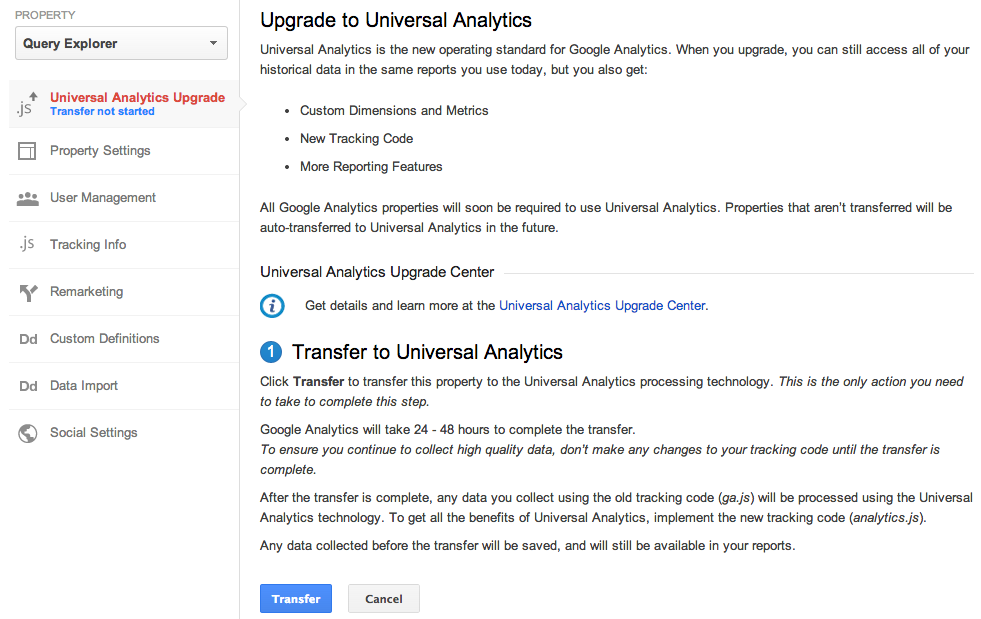
Today, we’re announcing the Universal Analytics Upgrade Center, an easy, two-step process to upgrade your existing properties from classic Google Analytics to Universal Analytics.

Once you complete the upgrade process, you can continue to access all of your historical data, plus get all the benefits of Universal Analytics including custom dimensions and metrics, a simplified version of the tracking code, and better cross-domain and cross-device tracking support.

Getting Started

You can upgrade your classic Google Analytics properties into Universal Analytics properties by following these two steps:

Step 1: Transfer your property from Classic to Universal Analytics.
We’ve developed a new tool to transfer your properties to Universal Analytics that we will be slowly enabling in the admin section of all accounts. In the coming weeks, look for it in your property settings.


Step 2: Re-tag with a version of the Universal Analytics tracking code.
After completing Step 1, you’ll be able to upgrade your tracking code, too. Use the analytics.js JavaScript library on your websites, and Android or iOS SDK v2.x or higher for your mobile apps.

Universal Analytics Auto-Transfer

Our goal is to enable Universal Analytics for all Google Analytics properties. Soon all Google Analytics updates and new features will be built on top of the Universal Analytics infrastructure. To make sure all properties upgrade, Classic Analytics properties that don’t initiate a transfer will be auto-transferred to Universal Analytics in the coming months.

Upgrade Resources

To answer common questions, we’ve put together the Universal Analytics Upgrade Center, a comprehensive guide to the entire upgrade plan. This guide includes an overview of the process, technical references for developers, and a project timeline with phases of the overall upgrade.

We’ve also included FAQs in the Upgrade Center, but if you need more information, you can also visit the new Universal Analytics Google Group to search for answers and ask more specific questions.

We’re excited to offer you this opportunity to upgrade, and hope you take advantage of the resources we’ve created to guide you through the process. Visit the Universal Analytics Upgrade Google Group to share your comments and feedback. We’d love to hear what you have to say!

Posted By Nick Mihailovski, on behalf of the Google Analytics Team

A beta preview: supervised users

As someone who has helped numerous family members get online for the first time, I know how rewarding it can be. I enjoy sitting down with my daughter, watching her eyes light up at new favorites we find together on the web. Like many of you, I also find it important to keep family members protected from websites that may be inappropriate. To help those who may need some guidance browsing the web, we’re kicking off a beta channel preview of a new feature called supervised users.

Let’s say you’ve recently purchased the new HP Chromebook 11 and want to share it with your son. He’ll be able to use your Chromebook as a supervised user. This means once you’ve created a supervised user for him on your Chromebook, you’ll be able to visit chrome.com/manage to review a history of web pages he has visited, determine sites that you want to allow or block, and manage permissions for any blocked websites he has requested to view.


We hope this new feature helps you share Chromebooks with everyone in your family. Additionally, you can try an early version of supervised users on Chrome beta for Windows, Mac and Linux, too. This is just the beginning — we’d love to get your feedback on features you’d like to see. If you’re on the beta channel, supervised users will begin rolling out this week. Give it a try, and let us know what you think!

Handwriting input comes to Gmail and Google Docs


Cross-posted on the Google Drive blog

Gmail and Docs offer wide language support, however in some cases using the keyboard is less than ideal. Whether you’re a student trying to include a foreign phrase in your paper or an international consultant hoping to begin your message with a friendly local greeting, now you’ll be able to use your own handwriting to input words directly into Gmail and Google Docs with your mouse or trackpad.

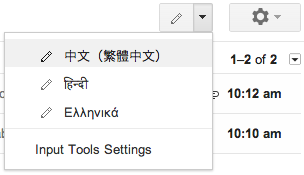
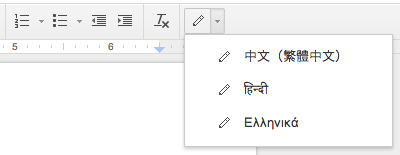
To try it out, enable input tools in Gmail or Docs and select the handwriting input (represented by a pencil icon) of the language you want to use.
       
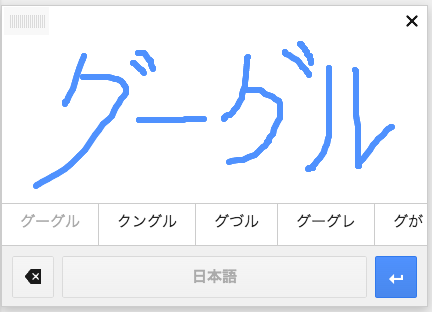
You can write single or even multiple characters at once in the panel to see them show up in your message or document. Currently, handwriting input is available in Google Docs for over 20 languages and in Gmail for over 50 languages, including Chinese, Japanese, Hindi and Russian.
Handwriting input makes the internet easier to use by people worldwide and is also part of a larger effort to break the barrier between languages, check it out in Google Mobile Search, Google Translate (Web, Android and iOS), and the Chrome browser.

Handwriting input comes to Gmail and Google Docs

(Cross-posted on the Gmail blog)

Gmail and Docs offer wide language support, however in some cases using the keyboard is less than ideal. Whether you’re a student trying to include a foreign phrase in your paper or an international consultant hoping to begin your message with a friendly local greeting, now you’ll be able to use your own handwriting to input words directly into Gmail and Google Docs with your mouse or trackpad. To try it out, enable input tools in Gmail or Docs and select the handwriting input (represented by a pencil icon) of the language you want to use.
       
You can write single or even multiple characters at once in the panel to see them show up in your message or document. Currently, handwriting input is available in Google Docs for over 20 languages and in Gmail for over 50 languages, including Chinese, Japanese, Hindi and Russian.
Handwriting input makes the internet easier to use by people worldwide and is also part of a larger effort to break the barrier between languages, check it out in Google Mobile Search, Google Translate (Web, Android and iOS), and the Chrome browser.

Calling All Music Fans: YouTube Music Award Voting Opens Today

What do waking up, paper planes, hives, goblins, and five people on one guitar have in common? On November 3, Avicii, M.I.A., Earl Sweatshirt, Tyler the Creator, and Walk Off the Earth will all perform live at the first-ever YouTube Music Awards, joining a top musical lineup at Pier 36 in New York City. Actor and musician Jason Schwartzman is joined by comedian and musician Reggie Watts to host this live event. Music video visionary Spike Jonze is creative director, with executive producers VICE Media and Sunset Lane Entertainment.

And now it’s your turn. YouTube Award Nominations across six categories have just been announced at youtube.com/musicawards. Starting today, you can go there or search “YTMA” on YouTube to vote on the nominees by sharing the official YouTube Music Awards nomination videos across Google+, Twitter and Facebook. These video and artist nominations are based on YOUR views, likes, comments and subscriptions over the last 12 months from September 2012, and your votes from today will determine the winners.

The six nomination categories and nominees for this year’s YouTube Music Awards are:

Video of the Year: Honoring the world’s most loved music videos, these nominees represent the videos with the most fan engagement on YouTube over the last year.


  • Demi Lovato - Heart Attack
  • Epic Rap Battles of History - Barack Obama vs Mitt Romney
  • Girls' Generation - I Got A Boy
  • Justin Bieber (feat. Nicki Minaj) - Beauty And A Beat
  • Lady Gaga - Applause
  • Macklemore & Ryan Lewis (feat. Mary Lambert) - Same Love
  • Miley Cyrus - We Can't Stop
  • One Direction - Best Song Ever
  • PSY - Gentleman
  • Selena Gomez - Come & Get It


Artist of the Year: Honoring the acts YouTube fans have made stars, nominees represent the most watched, shared, liked, and subscribed-to artists on YouTube.

  • Eminem
  • Epic Rap Battles of History
  • Justin Bieber
  • Katy Perry
  • Macklemore & Ryan Lewis
  • Nicki Minaj
  • One Direction
  • PSY
  • Rihanna
  • Taylor Swift


Response of the Year: Honoring the best fan remix, parody or response video, these nominees represent the top “unofficial” fan videos on YouTube based on your views, shares and other activity.

  • Boyce Avenue (feat. Fifth Harmony) - Mirrors
  • Jayesslee - Gangnam Style
  • Lindsey Stirling and Pentatonix - Radioactive
  • ThePianoGuys - Titanium / Pavane
  • Walk Off the Earth (feat. KRNFX) - I Knew You Were Trouble


YouTube Phenomenon: Recognizing the YouTube trends the world could not escape from, nominees are based on the phenomena that generated the most fan videos.

  • Diamonds
  • Gangnam Style

  • Harlem Shake
  • I Knew You Were Trouble
  • Thrift Shop


YouTube Breakthrough: Honoring the music world’s breakout new acts, nominees represent the artists who experienced the biggest growth in views and subscribers.

  • Kendrick Lamar
  • Macklemore & Ryan Lewis
  • Naughty Boy
  • Passenger
  • Rudimental


Innovation of the Year: Starting with videos selected by an international panel of musicians, YouTubers and creative luminaries, we then selected the creative video innovations that resonated most with fans on YouTube, based on views, likes, shares and comments.

  • Anamanaguchi - ENDLESS FANTASY
  • Atoms For Peace - Ingenue
  • Bat For Lashes - Lilies
  • DeStorm - See Me Standing
  • Toro Y Moi "Say That"


In the run up to the YouTube Music Awards, five music events will be streamed from around the world on YouTube, culminating in the live awards celebration at Pier 36 in New York City. The shows from Seoul, Tokyo, Moscow, London and Rio will kick off at 5 a.m. ET on November 3, and fans can tune in at youtube.com/musicawards.

So what are you waiting for? Head over to youtube.com/musicawards to watch the nomination videos and cast your votes. Stay tuned for more information on the big show and we’ll see you on Sunday, November 3!

The YouTube Music Awards Team recently watched “Announcing the first-ever YouTube Music Awards.”